
You are using an out of date browser. It may not display this or other websites correctly.
You should upgrade or use an alternative browser.
You should upgrade or use an alternative browser.
Casual Computer Chat
- Thread starter aeon
- Start date
More options
Who Replied?


- MBTI
- ENFP
- Enneagram
- 947 sx/sp
So I was doing a couple of pathfinder actions in Adobe Illustrator and it took my i9 MacBook Pro 4.5 hours to complete. This was likely because the artwork had just shy of 189,000 points in it.
And that’s when I saw I had an error in the artwork.
So I simplified the paths down to just shy of 48,000 points, and reran the process...1 hour so far.
Process removes all vectors overlapped and hidden by other vectors so final file is flattened, discrete, filled vector shapes.
Sigh,
Ian
And that’s when I saw I had an error in the artwork.
So I simplified the paths down to just shy of 48,000 points, and reran the process...1 hour so far.
Process removes all vectors overlapped and hidden by other vectors so final file is flattened, discrete, filled vector shapes.
Sigh,
Ian

Enso
Community Member
- MBTI
- INFJ
Does anyone got any PC flex.
Currently running Ryzen 1600, 16gb, GTX 970. It's the only computer I've had that I've had over 3 years without upgrading. It's going on 5 years now and still plays every game I've tried on at least medium. I would like to upgrade for faster video encoding but it still does well.
Currently running Ryzen 1600, 16gb, GTX 970. It's the only computer I've had that I've had over 3 years without upgrading. It's going on 5 years now and still plays every game I've tried on at least medium. I would like to upgrade for faster video encoding but it still does well.

- MBTI
- INFJ
- Enneagram
- 5w4
Does anyone got any PC flex.
Currently running Ryzen 1600, 16gb, GTX 970. It's the only computer I've had that I've had over 3 years without upgrading. It's going on 5 years now and still plays every game I've tried on at least medium. I would like to upgrade for faster video encoding but it still does well.
Maybe @sprinkles or @jkxx but I haven't seen them around lately.
- MBTI
- INFJ
- Enneagram
- 5w4
So I was doing a couple of pathfinder actions in Adobe Illustrator and it took my i9 MacBook Pro 4.5 hours to complete. This was likely because the artwork had just shy of 189,000 points in it.
And that’s when I saw I had an error in the artwork.
So I simplified the paths down to just shy of 48,000 points, and reran the process...1 hour so far.
Process removes all vectors overlapped and hidden by other vectors so final file is flattened, discrete, filled vector shapes.
Sigh,
Ian
Bleh!
There seems to be an argument among creatives about which is better, MacBook or iMac. I know a few photogs who ditched iMac for new Macbooks, either because they prefer to work smaller or because of memory issues. I switched from Macbook to iMac. I still have two slots for memory and my 2017 machine is doing fine. I store far too much of my work on it (I also have several external hard drives with duplicates.) I work big, too. I like to work bigger than I need for print.
Apple has changed so much since Jobs died, even though he wasn't exactly at the helm in later years. I was loyal to this system because Macs lasted forever and were more user-friendly for right-brained people. We had a custom-built G4 for twelve years before it became obsolete. Yes, you could custom-build Macs years ago, just like PC, but most people didn't bother. I finally tried a patch on the G4 that "killed" it. Mac experts told me it was toast. The screen was black. I set it on my floor and typed in code until the screen "woke up" and responded. I kept guess working the coding until I got the computer back to normal. I had to get a new computer anyway because the G4 would no longer run software updates, but I got it to work properly. Please keep in mind, I did not know any coding when I did this. I just worked intuitively. I later went back to school for coding.
Now, Macbooks are disposable, like their phones, and the desktop monster is the only one geared toward professionals. You really need to stay on your game with external HDs and memory to keep them working, though.
Though, with Procreate only available on iPad, I wonder WTH is going on with Apple's focus on creative professionals. (Adobe was originally designed specifically for Mac, just like Procreate is now.)
I dunno. If it is taking "thousands" of hours to render maybe you need to work smaller or get your other work onto external hard drives? Or just get a different machine?
- MBTI
- ENFP
- Enneagram
- 947 sx/sp
@Asa
This MacBook Pro will be fine for a bit yet—the reason my process took so long is because it cannot be multithreaded, and must run on a single core. Each point needs to be compared to every other point.
I’ll just avoid getting too crazy with the mandalas, or start the process when I go to bed.
Cheers,
Ian
This MacBook Pro will be fine for a bit yet—the reason my process took so long is because it cannot be multithreaded, and must run on a single core. Each point needs to be compared to every other point.
I’ll just avoid getting too crazy with the mandalas, or start the process when I go to bed.
Cheers,
Ian


Jexocuha
Cave Ghost
- MBTI
- 0x494E
- Enneagram
- 0b100
This thread is for casual commentary about the project you are working on, your wished-for upgrade, your shiny new whatever, your frustrations, cool tools, and other random nerdiness.
Cheers,
Ian
I keep it simple these days outside of my job. One of my Dell laptops, a Latitude E6440, got petroleum jelly wasted all over the keyboard. I had not replaced any electronics in this one yet, so the battery and power adapter may need replacing. I bought the dang thing for $35.00 on eBay. It had Windows 10 on it. I did my little special Windows mod on it, replaced most of the software with fsf/gnu/simpler tools. Installed the vm manager on it, setup firewall, removed as much Windows components as possible, modified windows account security and privacy features etc. It worked like a charm for awhile after my preferred dell latitude 2100 screen accidentally got cracked. The E6440 can dual boot with the sdhc memory card to whatever preferred*Nix OS. Set a full installation of 64-bit Mx-Linux in the removable memcard - which what I lazily used to do much of my personal stuff on, up until this day for the past 5 months or so, and am I mulling over getting another latitude 21xx for portable computing.
I do private projects mostly on cheap laptops in the multivt mode, or in a minimal graphical desktop env gui. All I really need these days is Linux, OpenSSH/SFTP, GCC, Vi editor, nettools, gpg/pgp, coreutils, a dedicated browser(Firefox), hypervisor+, emulator, and basic gui image software. I can do a whole lot of stuff, and still practicing more, with just that.
I'm still tweaking my private server farm and home network applications and functions. I'm writing code for a custom data archive library(not too different from line a library catalog system), that allows me to locate, organize, and search contents being archived and duplicated on optical archive disks.
Jexocuha
Cave Ghost
- MBTI
- 0x494E
- Enneagram
- 0b100
Backed up personal project I've been wanting to try for a long time: Linux From Scratch
Although, right now I've chosen to spend more time really getting comfortable with the BSD OS environment and administration, I've always wanted to go through the LFS OS docs and practice getting better at the Linux OS by building it from "scratch" with source code. The documentation and packages allow the user to create their own customized kernel+package system and into a Linux OS of their own.
.
Although, right now I've chosen to spend more time really getting comfortable with the BSD OS environment and administration, I've always wanted to go through the LFS OS docs and practice getting better at the Linux OS by building it from "scratch" with source code. The documentation and packages allow the user to create their own customized kernel+package system and into a Linux OS of their own.
One idea I had was using this model+tools as a framework for building a "Lojban-based" customized OS. that can modify code and run jobs with a voice recognition input system that can parse spoken Lojban speech or text input into understandable statements and data processes. It's both for extreme privacy and human language integrated with machine communication
Jexocuha
Cave Ghost
- MBTI
- 0x494E
- Enneagram
- 0b100
The Free Software DirectoryFriday IRC Meeting
Join the Free Software Foundation (FSF) on Friday 12:00 to 15:00 EDT for the Free Software Directory IRC meetings, in the #fsf Libera.chat moderated by the FSF staff!
Our day and time is right now: Wednesday 20:01 EDT —— meeting is tomorrow
Run this terminal program in a GNU/Linux system terminal to see the meeting start time in your time zone:
$ date --date='TZ="America/New_York" 12:00 this Fri'
Regardless of the topic, administrators will verify and approve new software proposed by users, correct existing pages and provide technical assistance publicly in the channel. All users are welcome.
https://directory.fsf.org/wiki/Main_Page
Full package list https://directory.fsf.org/wiki/Category/All
- MBTI
- ENFP
- Enneagram
- 947 sx/sp
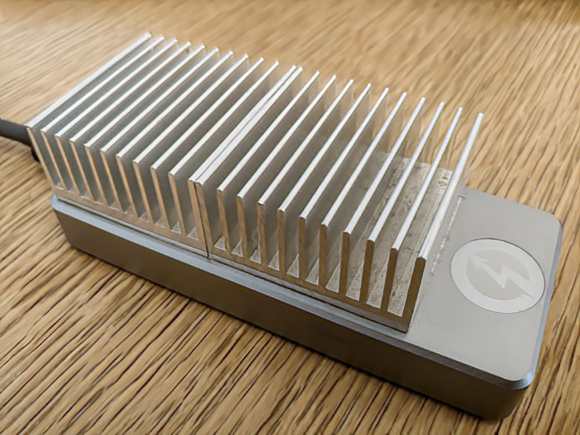
That is an external 2TB TB3-on-USB-C NVME drive (by Sabrent). I use it as a Time Machine volume for my Mac.
It used to get so hot under load that I could burn myself by touching it.
I added a strip of thermal tape and two 40^2 mm heat sinks. That cost $10 USD.
Now it barely gets warm to the touch, and there is no longer any NVME controller throttling.
Cheers,
Ian
- MBTI
- INFJ
- Enneagram
- 5w4
Not sure this qualifies as casual, but if anyone has extensive knowledge/ experience with Mac studio compatible monitors, I'd love your input. It needs to be sharp, bright, and have high color accuracy.
I'm looking for a more affordable alternative to the Mac Studio Display.
Asus Proart? Benq? Kuycon? Dell? LG? Viewsonic?
I'd prefer a glossy monitor because the matter finish makes linework and text a tiny bit little fuzzy, but it seems like the big Graphic Design firms have weighed in and prefer the matte screens in their office environments, so the companies obliged. (If you've used a Mac monitor, you know the screen is glossy, but not highly reflective.)
Specs:
Color: 1+ billion, 10-bit. RGB. High accuracy.
4k--6k.
Thunderbolt, USB4, USB-C
Oled optional
400+ nits
prefer glossy screen.
web cam and speakers not needed.
I saw an LG model side-by-side with the Mac (at an indie shop), and it looked dull. I don't know the model. The same guy said the Dell is "disappointing." I realize the point was to push the Mac as superior and wondered if he had lowered the contrast for that reason. I later went to Best Buy and they were pushing oled Alienware gaming monitors and didn't have any of the Pro monitors in stock. Response time is more important than color accuracy and sharpness for gaming.
I've combed review, YT, and Reddit. Most people reviewing monitors are gamers or don't need a monitor for art/professional work.
Some claim the Kuycon has a magenta cast on one side of the monitor straight out of the box. There is talk this can be fixed w/ calibration. (????) Not sure... Kuycon seems a bit risky.
I know there is a slim chance anyone here has a strong opinion on which monitor is the best choice. Thought I'd try. If you have strong opinions on any of these companies or specs, please share.
Thank you.
I'm looking for a more affordable alternative to the Mac Studio Display.
Asus Proart? Benq? Kuycon? Dell? LG? Viewsonic?
I'd prefer a glossy monitor because the matter finish makes linework and text a tiny bit little fuzzy, but it seems like the big Graphic Design firms have weighed in and prefer the matte screens in their office environments, so the companies obliged. (If you've used a Mac monitor, you know the screen is glossy, but not highly reflective.)
Specs:
Color: 1+ billion, 10-bit. RGB. High accuracy.
4k--6k.
Thunderbolt, USB4, USB-C
Oled optional
400+ nits
prefer glossy screen.
web cam and speakers not needed.
I saw an LG model side-by-side with the Mac (at an indie shop), and it looked dull. I don't know the model. The same guy said the Dell is "disappointing." I realize the point was to push the Mac as superior and wondered if he had lowered the contrast for that reason. I later went to Best Buy and they were pushing oled Alienware gaming monitors and didn't have any of the Pro monitors in stock. Response time is more important than color accuracy and sharpness for gaming.
I've combed review, YT, and Reddit. Most people reviewing monitors are gamers or don't need a monitor for art/professional work.
Some claim the Kuycon has a magenta cast on one side of the monitor straight out of the box. There is talk this can be fixed w/ calibration. (????) Not sure... Kuycon seems a bit risky.
I know there is a slim chance anyone here has a strong opinion on which monitor is the best choice. Thought I'd try. If you have strong opinions on any of these companies or specs, please share.
Thank you.
- MBTI
- ENFP
- Enneagram
- 947 sx/sp
Okay, I have done an ADHD deep dive to determine the best option of what is available, with the criteria weighted as thus:
My sense is that you have only to choose a 32" display, or 27" display.
ASUS ProArt PA329CRV...$848
ASUS ProArt PA279CRV...$678
(B&H pricing quoted for reference)
Nails color, price, panel technology, and calibration.
Competitively meets the standard on everything else.
What are you giving up? Resolution. It is “only” a 4K display. 5K doubles your price such that the Apple Studio Display becomes the easy choice. Also, it is matte. Don’t even pretend there is an alternative for that, right now.
I hope this is of some help.
I learned a lot. Part of what I learned is that for fine arts, graphic design, and retouching, there are not many options.
The ASUS ProArt quickly became the option.
Cheers,
Ian
- color accuracy
- price
- calibration
- compatibility
- connectivity
- resolution
- brightness
- screen type
- xtra features
My sense is that you have only to choose a 32" display, or 27" display.
ASUS ProArt PA329CRV...$848
ASUS ProArt PA279CRV...$678
(B&H pricing quoted for reference)
Nails color, price, panel technology, and calibration.
Competitively meets the standard on everything else.
What are you giving up? Resolution. It is “only” a 4K display. 5K doubles your price such that the Apple Studio Display becomes the easy choice. Also, it is matte. Don’t even pretend there is an alternative for that, right now.
I hope this is of some help.
I learned a lot. Part of what I learned is that for fine arts, graphic design, and retouching, there are not many options.
The ASUS ProArt quickly became the option.
Cheers,
Ian
- MBTI
- INFJ
- Enneagram
- 5w4
@aeon -- Thank you! <3 I did not see that reply.
The Asus ProArt was in my cart at B&H before I wrote my post, but I'm waffling. I've decided on 5k.
I'm currently deciding between a BenQ MA270S 5k and an Asus ProArt 5k. (There is also the Kuycon.)
I'm keeping my iMac set up with my Studio, so I will be able to compare color accuracy to a Mac screen.
I can't see either of these in person before purchasing, so I'm relying on reviews on Reddit, YT, etc.
PPI:
Asus: 218PPI
BQ 218PPL
Color:
Both: 10-bit aka 1.07 Billion.
Res:
Both: 5k
Color Accuracy:
Asus: 100% RGB, 100% Rec 709, 99% DCI-P3, 95% Adobe RGB,
BQ: 99%RGB 99%DCI-P3 -- calibrates to a Mac screen when a Mac is plugged in. Made specifically for Macs.
Brightness:
Asus: 500 nits.
BQ: 450 nits
Finish:
Asus: Matte (Manufacturing claims it is sharp, some users say it is less sharp due to the matte coating).
BQ: Nano gloss. (Users claim it looks just as sharp as Apple.)
Connection:
Asus: USB-C 3.2 / USB-A 3.2
BQ: Thunderbolt 4 / USB-A / USB-C
The Asus ProArt was in my cart at B&H before I wrote my post, but I'm waffling. I've decided on 5k.
I'm currently deciding between a BenQ MA270S 5k and an Asus ProArt 5k. (There is also the Kuycon.)
I'm keeping my iMac set up with my Studio, so I will be able to compare color accuracy to a Mac screen.
I can't see either of these in person before purchasing, so I'm relying on reviews on Reddit, YT, etc.
PPI:
Asus: 218PPI
BQ 218PPL
Color:
Both: 10-bit aka 1.07 Billion.
Res:
Both: 5k
Color Accuracy:
Asus: 100% RGB, 100% Rec 709, 99% DCI-P3, 95% Adobe RGB,
BQ: 99%RGB 99%DCI-P3 -- calibrates to a Mac screen when a Mac is plugged in. Made specifically for Macs.
Brightness:
Asus: 500 nits.
BQ: 450 nits
Finish:
Asus: Matte (Manufacturing claims it is sharp, some users say it is less sharp due to the matte coating).
BQ: Nano gloss. (Users claim it looks just as sharp as Apple.)
Connection:
Asus: USB-C 3.2 / USB-A 3.2
BQ: Thunderbolt 4 / USB-A / USB-C
- MBTI
- ENFP
- Enneagram
- 947 sx/sp


